Elasticsearch is excellent at storing and finding data. It is not, on its own, very good at doing anything with that data — and that gap became obvious recently when a batch of alert documents started piling up in an index with nowhere to go.
This post is about the small piece of automation that closed that gap, why a workflow tool ended up being the right answer instead of more Elasticsearch configuration, and how the whole thing fits together.
The Problem: Alerts That Just Sit There
Part of the homelab’s Elastic Stack generates “alert” documents — records that say, in effect, “something matched a rule worth a human looking at.” Each one lands in an alerts index with details like which rule fired and what the underlying issue was.
The catch: writing a document into an index doesn’t notify anyone. Elasticsearch will happily store ten thousand alerts and never tell a soul. Something else has to periodically check for new ones and actually act on them — in this case, by sending an email.
The licensed (paid) tier of the Elastic Stack includes a feature called Watcher that can do exactly this kind of “check and notify” work natively. The free, self-managed version this homelab runs does not include it. So the alerting logic needed to live somewhere else entirely, outside of Elasticsearch.
Why n8n
n8n is a self-hosted workflow automation tool — think of it as a visual, drag-and-drop way to wire “when this happens, do that” logic between different systems, without writing a full application to do it. You build a workflow as a chain of connected steps on a canvas: a trigger on one end, a series of actions in the middle, and the result on the other end. It’s the same general idea as tools like Zapier, but self-hosted, which matters for a homelab where data shouldn’t have to leave the network to get from one service to another.
It was a natural fit here for a simple reason: it already speaks Elasticsearch, and it already speaks email. Rather than writing and maintaining a small standalone script to poll an index and call an email API — and then having to host, monitor, and patch that script forever — n8n provides both of those connections as ready-made building blocks, along with a scheduler to run the whole thing automatically.
n8n was deployed into the Kubernetes cluster the same way everything else in the homelab is — version-pinned, deployed through GitLab CI/CD, backed by the existing external Postgres database rather than a one-off SQLite file. It’s just one more managed service in the stack rather than a side project living on someone’s laptop.
What the Workflow Actually Does
The finished workflow is four steps, run automatically every five minutes:
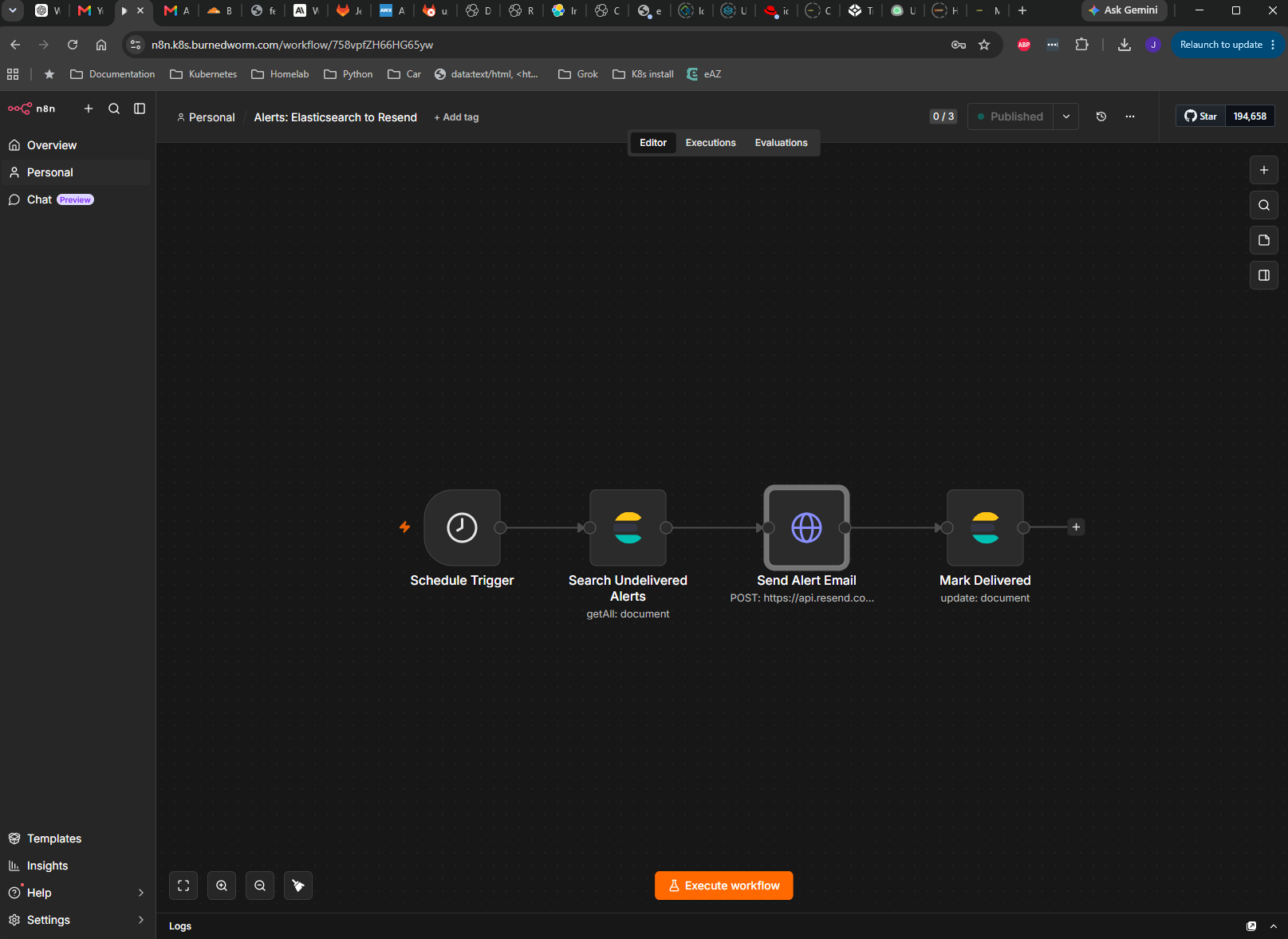
- Schedule Trigger — wakes the workflow up every five minutes. No manual checking required.
- Search Undelivered Alerts — asks Elasticsearch for any alert documents that haven’t been emailed yet.
- Send Alert Email — for each one found, sends an email with the alert details.
- Mark Delivered — flags that document so it never gets emailed twice.
The “haven’t been emailed yet” check is the clever part, and it’s deliberately simple: each alert document gets a delivered flag added to it the moment its email goes out. The search step only looks for documents without that flag. No flag means it’s new and needs an email; once the flag is added, that document is permanently done, and future runs skip right over it.
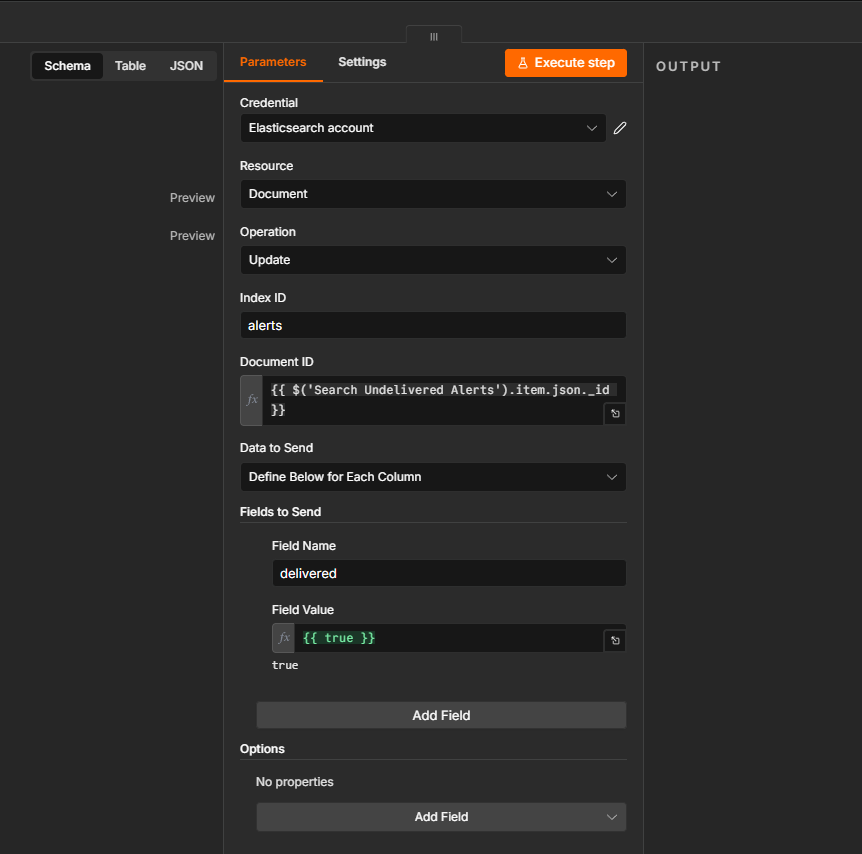
That one field does the job of deduplication without needing a separate tracking database or any extra moving parts — the alert data and the “have we handled this” state live in the exact same place.
Sending the Actual Email
For the email itself, the workflow calls out to Resend, the transactional email service already used elsewhere in the homelab for monitoring alerts. n8n doesn’t need a dedicated, purpose-built connector for every possible service — its generic HTTP request step, combined with a securely stored credential, is enough to talk to any API that accepts standard requests.
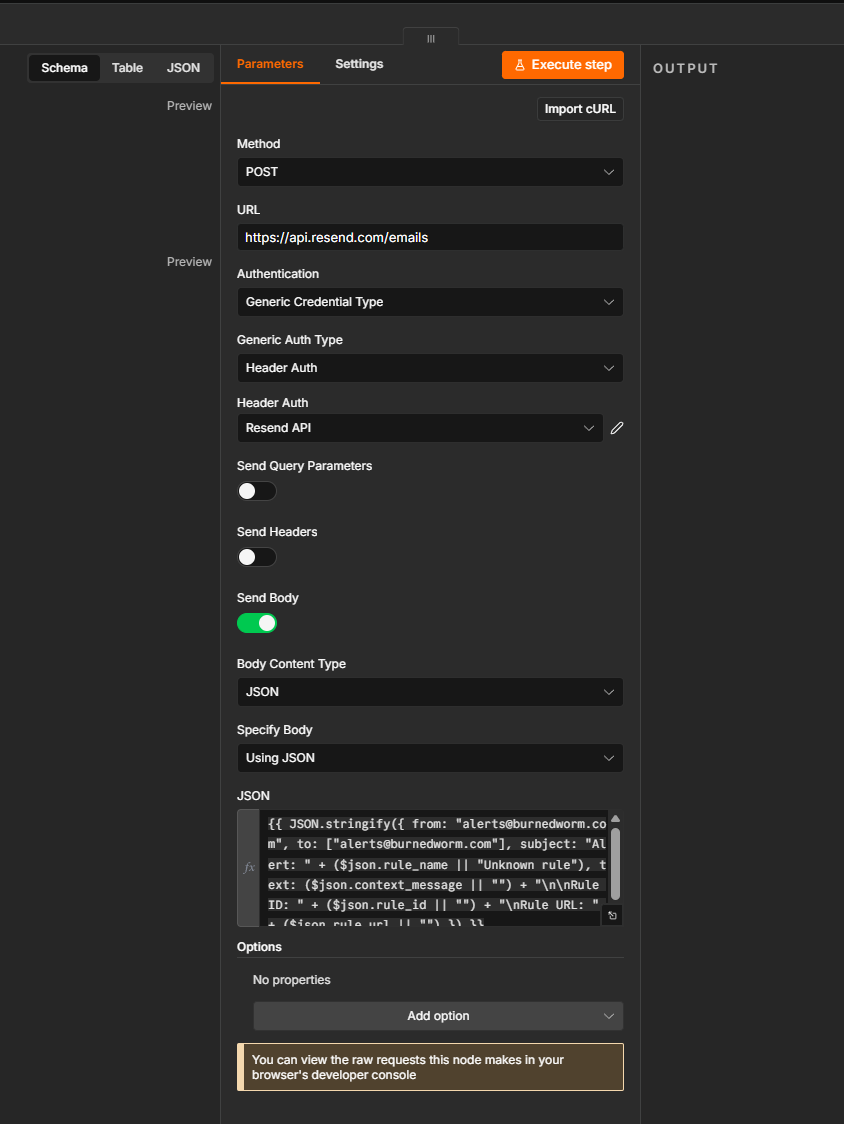
The credential itself — the API key that authorizes sending email — is stored encrypted inside n8n and referenced by name in the workflow, rather than being typed directly into any step. That keeps the actual secret out of the workflow definition entirely.
The Result
What used to be alert documents quietly accumulating in an index with no one the wiser is now a self-contained loop: new alert appears, gets picked up within five minutes, triggers an email, and gets marked so it’s never sent twice. No new application to maintain, no script running on a forgotten cron job somewhere — just one more workflow living in a system that’s already designed to be watched, version-controlled, and easy to extend the next time something else needs to be wired up to something else.
Jeremy Blackburn is a systems and infrastructure engineer and principal of Initech Advising LLC. He helps organizations modernize infrastructure and build reliable platforms at scale.